
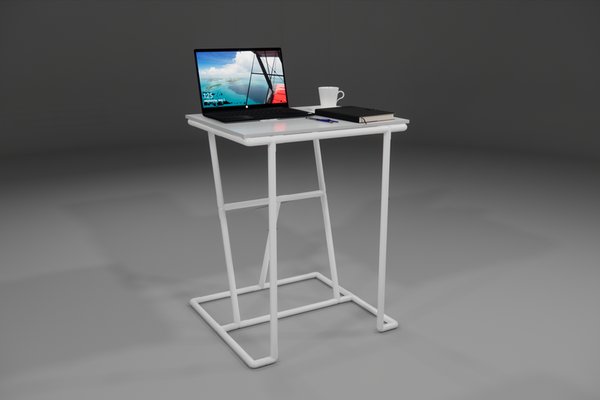
What computer furniture small spaces can fit comfortably?
The best computer furniture small spaces can accommodate is a 40 to 48 in wide desk, at least 24 in deep for a separate monitor and keyboard, paired with an adjustable chair and vertical storage. Keep a 30 in clear walking route, check the chair’s pullback space, and choose furniture around your actual equipment.
A compact workstation should disappear into the room when you finish, not make you fold yourself around it during work. Measure the chair, screen, outlets, and walking route before choosing a desk.
What computer furniture fits in a small room?
A small room can hold a practical workstation when the furniture gives the screen, keyboard, knees, and chair their own space. Start with the equipment you actually use, then select a desk that fits the wall without blocking a door.
These seven choices suit different routines. None is comfortable simply because the listing calls it compact.
- Straight desk, 40 to 48 in wide: The safest everyday choice if you have room for a 24 to 30 in deep top and a full-size chair.
- Wall-mounted fold-down desk: Best for occasional laptop work where a permitted, structurally secure mounting can be arranged.
- Compact corner desk: Makes good use of an unused corner if the screen still sits far enough from your eyes.
- Slim writing desk with open legs: Good for knee room, but its top must still support the entire keyboard and mouse.
- Freestanding ladder workstation: Moves light supplies upward without spreading across the floor; keep heavy equipment off high shelves.
- Small adjustable-height desk: Useful for longer sessions when its seated setting, frame, and chair clearance genuinely suit you.
- Compact desk with side cabinet: Keeps chargers and paper nearby provided drawers do not collide with your knees.
Before buying computer furniture for small spaces, tape the proposed footprint on the floor. Mark the desk edges and the chair’s occupied position while someone is sitting in it, not simply where it tucks away.
Match the desk to the room, not the photograph
A fold-down desk still needs somewhere to store the chair and equipment before closing. A freestanding model is easier to move in a rental; wall fixing requires explicit permission and a suitable structure.
| Room condition | Freestanding compact desk | Wall-mounted fold-down desk |
|---|---|---|
| Daily work of 4 hours or more | Allows a stable monitor and keyboard setup | Can be cramped with a shallow leaf |
| Rental without drilling permission | Does not require wall fixings | Not suitable without approval |
| Shared living room | Occupies a permanent floor footprint | Closes after laptop-only sessions |
| Desktop tower and cables | Can allow separate ventilated storage | Needs a separate safe tower location |
| Uncertain wall strength | Stands on its own | Requires verified structural fixing |
For broader room planning, see small spaces furniture. If closing the desk matters, the principles behind folding furniture for small spaces are worth considering before committing.
How deep should a desk be for a monitor and keyboard?
Allow 24 to 30 in of usable desktop depth for a separate monitor and keyboard. A 20 in top may suit a laptop, but it can bring an external screen uncomfortably close or leave little room to position your hands.
OSHA’s workstation guidance places the preferred viewing distance at roughly 20 to 40 in between your eyes and the screen. That is a seated measurement, not simply the depth printed on the desk’s product page.
Measure your seated setup
Set a chair at the intended desk height. Keep both feet supported, your shoulders relaxed, and your forearms able to reach the keyboard without stretching. A fixed worktop can be too high for one user even when its dimensions look standard.
- Everyday desk width 40 to 48 in
- Monitor and keyboard desk depth 24 to 30 in
- Typical seated worktop height to assess 28 to 30 in
- Eyes to monitor screen 20 to 40 in
- Clear knee width to aim for 24 in
- Unobstructed walking route to aim for 30 in
These are planning targets, not guaranteed ergonomic fits or accessibility specifications. Include chair arms, monitor stand, and cable connectors in your actual test; the advertised outer dimensions miss all three.
Where should a compact workstation go to protect walkways?
Place it along a wall where pulling back the chair will not close the room’s main walking route. Aim for a clear 30 in path and test the door swing with the chair occupied, not just pushed under the desk.
Measure around drawer handles, beds, closet doors, and radiator projections. A route that works only when someone stands up and moves the chair is not genuinely clear; do not trail extension cords across it.
Control window glare and visual clutter
Place the monitor roughly perpendicular to a window when you can. A bright window directly behind or in front of the screen can produce glare or uncomfortable contrast; a movable shade helps control changing daylight.
For a room where the workstation wall needs paint, consider Benjamin Moore Pale Oak OC-20 on roughly 60 percent of the visible room surfaces. Sample it on the actual wall first, since both daylight and the existing flooring change its appearance.
#D8CFC4 · Benjamin Moore Pale Oak
Reads warmer and faintly pinker in south-facing light; north-facing daylight makes it look cooler and grayer. Use it on roughly 60 percent of the visible room surfaces and confirm the paint against a physical sample.
Keep the station visually contained to one wall instead of scattering chargers across furniture. If the usable wall has no safe power outlet, ask a qualified electrician about a permanent solution rather than routing cables through a doorway.
What storage can keep computer gear off a small work surface?
Choose storage that protects the keyboard-and-mouse zone without stealing knee space. A shallow organizer, a ventilated tower stand, and one drawer usually do more for daily use than a desktop crowded with decorative bins.
Give each accessory a practical home
- Cables: Gather excess length in removable clips along the back edge, leaving slack for moving equipment.
- Headphones: Use a clamp-on hook that does not hit the chair arms or knees.
- External drives: Keep them in a small tray with room for connectors and heat to escape.
- Desktop tower: Maintain clear vents and avoid putting it in an airtight cubby.
- Paper and spare chargers: Store them in a drawer that opens without blocking the walking path.
For tight rooms, office furniture for small spaces succeeds when useful worktop area remains after the equipment is installed. A drawer that strikes the chair is wasted capacity, however tidy it looks in product photography.
Use light objects on high shelves and keep frequently handled equipment between elbow and shoulder level. For supplies outside the desk footprint, storage furniture for small spaces provides other ways to avoid piling gear on the keyboard.
When does compact computer furniture fail in real rooms?
A desk that folds into a clean panel may look impressive in a photograph, but it is rarely convenient when you must unplug a monitor, clear cords, move the chair, and remove paperwork every evening. If you work at the computer daily, choose a workstation that can stay assembled. A shallow console disguised as a desk is another photo-only idea: it may hold a laptop while leaving no reasonable space for a keyboard and mouse.
Do not purchase a wall-mounted top for a rental that forbids drilling. Adhesive hooks are not a structural replacement for approved fixings. Likewise, a freestanding ladder shelf becomes risky where toddlers can climb it or pets can pull dangling cables; stabilize furniture appropriately and do not load high shelves with heavy equipment.
A motorized sit-stand desk is not automatically the answer either. If its moving frame hits the bed, its legs block your chair, or standing obstructs the doorway, the extra mechanism achieves nothing. A stationary desk with a suitable chair is a better decision than paying for movement you cannot use safely.
Frequently asked questions
Can a 40 in desk hold a monitor and laptop?
Often, yes, if the laptop is on a stand or closed while a separate keyboard is used. Measure both bases and allow mouse space before ordering.
Can I work full-time on a 20 in deep desk?
It may be too shallow for a separate monitor and keyboard. Check seated viewing distance and arm position; a 24 in deep top is a more practical starting point.
Does a compact desk need drawers?
No, drawers are optional when another cabinet or shelf holds occasional supplies. Open knee space and an accessible mouse position matter more than built-in storage.
Where can a desktop tower go?
Keep it on a stable surface with the ventilation clearance its manufacturer specifies. It should not crowd your legs or allow wires to tangle around rolling chair casters.
Can I make a bedroom workstation without drilling?
Yes, use a stable freestanding desk and movable storage. Test the bed, closet, and exit route with the chair pulled out before purchasing anything.
Choose a desk that works with the chair occupied, not just when the room is staged. A measured desktop, accessible storage, and a real walkway make a small workstation comfortable enough to use every day.